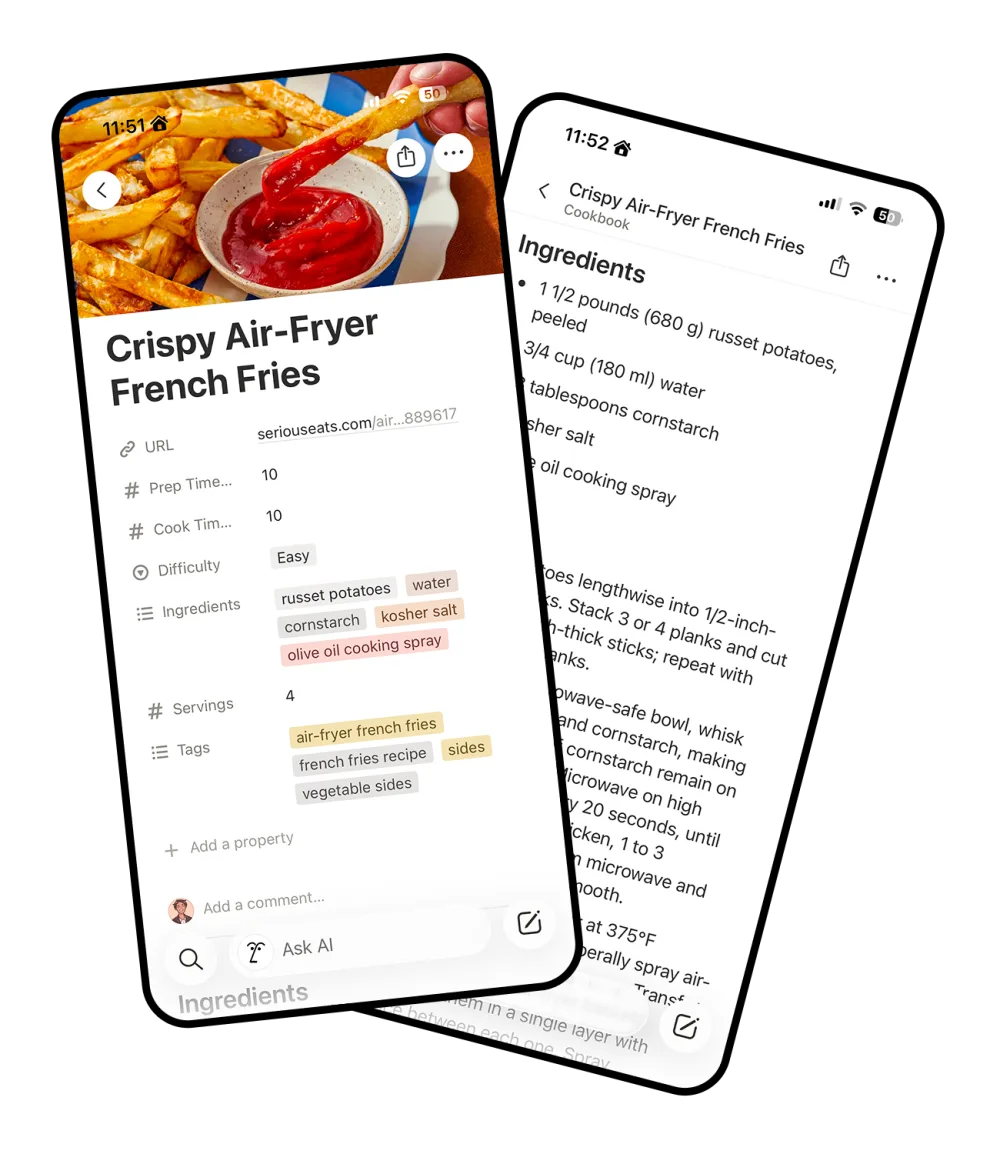
Keep the recipe. Skip the life story. Import ingredients, instructions and cooking times
into your own Notion cookbook. Paste a recipe URL or use our Chrome and Firefox recipe
clipper extensions.
Wait! Get my FREE air fryer meal plan!your@email.comYes please!
The BEST Crispy Air-Fryer French Fries (Better Than Takeout!!)
Posted by Kristy on March 3, 342 comments
Jump to Recipe
My grandmother's kitchen in Idaho always smelled of potatoes.She never owned an air fryer. She did own eleven cats.Before we get to the fries, I need to tell you about 1997.It was the summer I learned to ride a bike, and also thesummer I learned what a russet potato really is.
AdvertisementHot singles in your area want your fry recipe
Anyway, my husband Greg says these beat the drive-through,and Greg has been to a lot of drive-throughs.Pin this for later! My affiliate links are just below.
Crispy Air-Fryer French Fries
Prep 10 minCook 10 minServes 4
Ingredients
1 1/2 pounds (680 g) russet potatoes, peeled
3/4 cup (180 ml) water
3 tablespoons cornstarch
Kosher salt
Olive oil cooking spray
Instructions
Cut potatoes lengthwise into 1/2-inch-thick planks, then into 1/2-inch sticks.
Whisk water and cornstarch in a microwave-safe bowl; microwave, stirring every 20 seconds, until it thickens.
Toss the potatoes in the slurry, then air-fry at 375°F in a single layer until deep golden, about 10 minutes.
Cut potatoes lengthwise into 1/2-inch-thick planks, then into 1/2-inch sticks.
Whisk water and cornstarch in a microwave-safe bowl; microwave, stirring every 20 seconds, until it thickens.
Toss the potatoes in the slurry, then air-fry at 375°F in a single layer until deep golden, about 10 minutes.
Season with salt while hot.
Cook from your phone, not from a blog
Your recipes open in the Notion app on your phone, tablet or laptop. The ingredients and
steps are right there, with no pop-ups or ads jumping around while your hands are covered
in flour.
a real screenshot
How to save a recipe to Notion
1
Paste a link, or click the extension
Paste a recipe link above, or press the Recipe Clipper button in Chrome or Firefox while
you're on the recipe. The first time, connect your Notion account and set up the
Cookbook database in your workspace. Follow our recipe import guide for the setup steps.
seriouseats.com/crispy-air-fryer-french-fries
2
We cross out everything that isn't the recipe
The life story, pop-ups, ads and jump buttons stay behind. The title, times, servings,
ingredients and steps come with us.
3 tablespoons cornstarch
3
A clean page lands in your Notion
It's a page in your Cookbook with URL, Prep Time (mins), Cook Time (mins), Servings,
Difficulty, Tags and Ingredients filled in as real properties, plus the ingredient list
and numbered steps.
Crispy Air-Fryer French Fries EasyWeeknight Chickpea Curry EasySunday Braised Short Ribs Hard
Then filter your recipes like any Notion database
Times, difficulty, tags and ingredients are real properties, so filters, sorts, groups and
gallery views work the way they do everywhere else in Notion. Add notes, link it to a meal
planner or export it whenever you like. Keep the imported property names and types so new
recipes fill in correctly. Our Notion cookbook template guide explains the database setup.
Try a few filters on this sample cookbook.
Sample cookbook, 5 recipes shown
Name
Cook Time
Difficulty
Tags
Crispy Air-Fryer French Fries
10 min
Easy
sidesair fryervegetarian
Chinese Garlic Shrimp Clay Pot
20 min
Medium
dinnerseafood
Brown Butter Chocolate Chip Cookies
12 min
Medium
dessertbaking
Weeknight Chickpea Curry
25 min
Easy
dinnerveganone-pot
Crunchy Sesame Slaw
No cooking
Easy
sidesveganno-cook
5 of 7 recipes
Pricing
Your first 10 recipes are free. After that, saving unlimited recipes costs $12 a year. Cancel anytime. Every recipe you save
stays in your Notion.
Questions
How do I save recipes to Notion?
Connect your Notion account and set up the Cookbook database, then paste a recipe URL here or save the page with our Chrome or Firefox extension. Each saved recipe becomes an editable page in your own Notion workspace.
Are the properties real database properties?
Yes. URL, Prep Time (mins), Cook Time (mins), Servings, Tags, Difficulty and Ingredients are typed Notion properties. You can filter your cookbook by ingredient, sort by cooking time and make your own views.
Can I change the template?
You can add views, notes, formulas and links to a meal planner. Keep the imported property names and types unchanged so Recipe Clipper can continue filling them in. Renaming or deleting an imported property stops that field from being populated.
Do I need the browser extension?
No. You can paste a recipe URL on this website. The Chrome and Firefox extensions save the page you are viewing and can help with recipes that only appear after the page loads in your browser.
Can Recipe Clipper import every recipe website?
It works with recipe pages that provide readable ingredients and instructions, but some websites block access or use layouts we cannot extract. If pasting a link fails, try the browser extension on the loaded recipe page. Review the saved recipe against the source before cooking because automated extraction can make mistakes.
What happens after 10 recipes?
The first 10 are free forever. Unlimited clipping is a flat $12 a year. Cancel anytime; your recipes stay in your Notion regardless.
Build a Notion recipe collection you can cook from
Start with your first recipe import, set up a cookbook with useful filters, or save recipes
directly from your browser. These guides explain the steps and common setup problems.
Install Recipe Clipper for Chrome, connect Notion and save the recipe in your current tab. Learn shortcuts, Firefox support and import troubleshooting.